






Crypto Games ExtensionCrypto Games AppTelegram NewsSubmit

GTA 6 guides

30 new in the last 5 daysAll →
GTA 6 Phone Apps: What Is Peekhole?GTA 62 minutes agoGTA 6 Phone Apps: What Is Peekhole?GTA 6 Jason and Lucia Relationship: How It WorksGTA 622 minutes agoGTA 6 Jason and Lucia Relationship: How It WorksGTA 6 Photo Mode: Photo Studio, Snapmatic and SavingGTA 642 minutes agoGTA 6 Photo Mode: Photo Studio, Snapmatic and SavingGTA 6 Vehicles: Every Confirmed Type and CategoryGTA 61 hour agoGTA 6 Vehicles: Every Confirmed Type and CategoryGTA 6 Weapons and Weapon Wheel: What Is ConfirmedGTA 61 hour agoGTA 6 Weapons and Weapon Wheel: What Is ConfirmedGTA 6 Fuel System: Gas Stations and RefuellingGTA 62 hours agoGTA 6 Fuel System: Gas Stations and RefuellingGTA 6 Aim Assist Settings: Targeting, Strength, Quick DrawGTA 62 hours agoGTA 6 Aim Assist Settings: Targeting, Strength, Quick DrawGTA 6 Auto Drive and Driving Assist Settings ExplainedGTA 62 hours agoGTA 6 Auto Drive and Driving Assist Settings ExplainedHow to Turn Off Notifications and Help Text in GTA 6GTA 63 hours agoHow to Turn Off Notifications and Help Text in GTA 6GTA 6 Difficulty Settings: Is There an Easy Mode?GTA 63 hours agoGTA 6 Difficulty Settings: Is There an Easy Mode?How to Change the Language in GTA 6GTA 63 hours agoHow to Change the Language in GTA 6How to Set Up HDR and Brightness in GTA 6 on PS5GTA 64 hours agoHow to Set Up HDR and Brightness in GTA 6 on PS5How to Change the Camera in GTA 6: Height and Follow SpeedGTA 64 hours agoHow to Change the Camera in GTA 6: Height and Follow SpeedHow to Mute Licensed Music and GPS Voice in GTA 6GTA 64 hours agoHow to Mute Licensed Music and GPS Voice in GTA 6How to Turn Off Vibration and Adaptive Triggers in GTA 6GTA 65 hours agoHow to Turn Off Vibration and Adaptive Triggers in GTA 6GTA 6 Aim and Look Sensitivity: Settings and DefaultsGTA 65 hours agoGTA 6 Aim and Look Sensitivity: Settings and DefaultsHow to Invert the Y-Axis (Look) in GTA 6GTA 65 hours agoHow to Invert the Y-Axis (Look) in GTA 6How to Turn Off Motion Blur and Camera Shake in GTA 6GTA 66 hours agoHow to Turn Off Motion Blur and Camera Shake in GTA 6How to Change Units to Metric or Miles in GTA 6GTA 66 hours agoHow to Change Units to Metric or Miles in GTA 6GTA 6 Minimap and HUD Settings: Classic, Compass, Hide HUDGTA 66 hours agoGTA 6 Minimap and HUD Settings: Classic, Compass, Hide HUDGTA 6 PlayStation 30-Day License Timer: One Online CheckGTA 67 hours agoGTA 6 PlayStation 30-Day License Timer: One Online CheckGTA 6 Free GTA+ Month: How to Claim It and CancelGTA 67 hours agoGTA 6 Free GTA+ Month: How to Claim It and CancelGTA 6 Xbox Cloud Gaming, Xbox One and Remote Play ExplainedGTA 67 hours agoGTA 6 Xbox Cloud Gaming, Xbox One and Remote Play ExplainedGTA 6 Age Rating and Parental Controls: What Parents NeedGTA 68 hours agoGTA 6 Age Rating and Parental Controls: What Parents NeedCan You Play GTA 6 Offline? Internet and Account RulesGTA 68 hours agoCan You Play GTA 6 Offline? Internet and Account RulesCan You Get a GTA 6 Refund? PlayStation and Xbox RulesGTA 68 hours agoCan You Get a GTA 6 Refund? PlayStation and Xbox RulesGTA 6 Mods: What Rockstar's New Rules Allow and BanGTA 69 hours agoGTA 6 Mods: What Rockstar’s New Rules Allow and BanGTA 6 on Xbox Series S: Resolution, FSR and Frame RateGTA 69 hours agoGTA 6 on Xbox Series S: Resolution, FSR and Frame RateGTA 6 Accessibility Options: Subtitles, Colorblind, AssistsGTA 69 hours agoGTA 6 Accessibility Options: Subtitles, Colorblind, AssistsGTA 6 Car Damage: Tyres, Dents and How to RepairGTA 610 hours agoGTA 6 Car Damage: Tyres, Dents and How to Repair
STAR WARS Jedi: Fallen Order™ is 80% off on Steam: now $7.99 Steam

STAR WARS Jedi: Fallen Order™ is 80% off on Steam: now $7.99

-80% Usually $39.99 $7.99 You save $32.00

No end date announced The price could go back up at any time
  • PC
Buy on Steam (opens in a new tab)

Opens the official store page. You claim it with your own account.

Trailer

About this deal

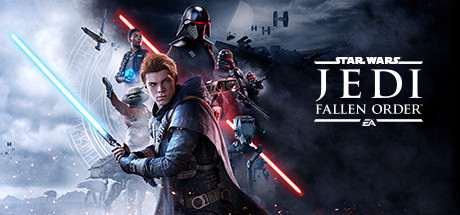
STAR WARS Jedi: Fallen Order™ is 80% off on Steam, which brings it from $39.99 down to $7.99. The deal covers the PC version. Steam lists no end date for the sale, so it could end at any time.

As the title suggests, this is a STAR WARS game built around a Jedi story. It suits PC players who follow STAR WARS and have been waiting for a lower price before picking it up.

A copy bought at the discounted price stays on your Steam account permanently. When the sale ends, only the store price changes: it goes back up to $39.99 for new buyers, and your copy stays in your library.

How to claim

  1. Open the STAR WARS Jedi: Fallen Order™ page on Steam
  2. Sign in to your Steam account
  3. Check that the price shows as $7.99
  4. Add it to your cart and check out at the discounted price

More huge discounts

See all
Townopolis — 80% off Epic Games Store

Ends in 2 days

Townopolis

-80% Usually $4.99 $0.99

  • PC
RPG MAKER UNITE — 85% off Epic Games Store

Ends in 3 days

RPG MAKER UNITE

-85% Usually $99.99 $14.99

  • PC