

Until this past July, every spoken word you sent to Claude got answered by Haiku, Anthropic’s least powerful model. That wasn’t a product decision so much as a latency one. Fast model, fast reply.
That restriction is gone. Voice mode now runs through Sonnet and Opus as well, and it can pull context from the apps and services you’ve connected to your account.
The model you pick matters less than you’d expect, though. What shapes the experience is the plumbing underneath it.

It waits for you to finish, and it sometimes guesses wrong
Claude’s voice mode uses a turn-based architecture. It listens, you stop, then it generates. ChatGPT's voice mode works differently after a recent OpenAI update to a duplex architecture, which gives its GPT-Live models the ability to process speech and generate outputs at the same time.
A turn-based system reads a breath as a full stop. Pause to think mid-question and Claude may decide you’re done, then answer the half you already said.
Anthropic's own advice is to ask multi-part questions one at a time instead of all at once. Take it. That’s the difference between a usable session and one where you keep interrupting a chatbot that interrupted you first.
Starting a session takes two taps
Voice mode is available in the Claude mobile apps for Android and iOS, in the desktop app and on the web. Anthropic says the feature works best from your phone.
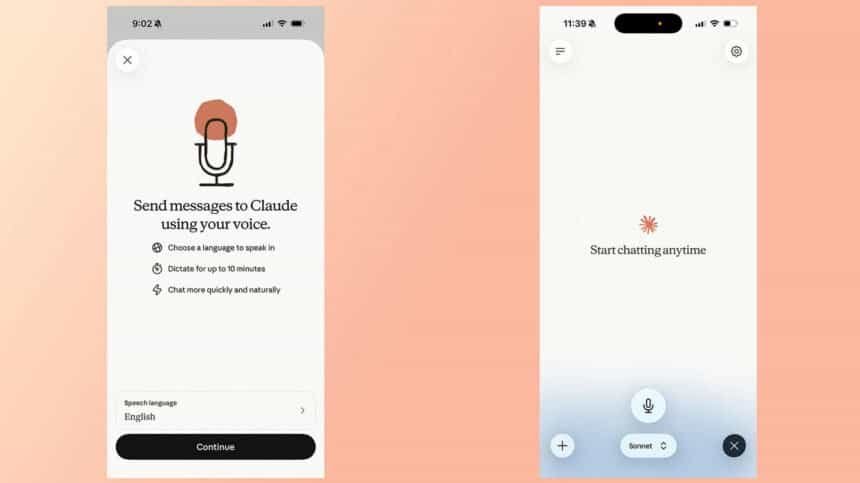
Open the app and tap the black waveform icon in the lower right corner of the interface. Not the microphone icon sitting right next to it, which is the one you’ll hit by accident the first few times.
Grant microphone permissions if the app asks for them. Then talk. Claude generates a response once you’ve finished a prompt, and it stays in voice mode until you tap Stop.
The model picker sits at the bottom of the screen
You can change which model answers you from the picker at the bottom of the interface. Anthropic describes Haiku as fastest for quick answers, Sonnet as most efficient for everyday tasks and Opus as the one for complex tasks. Opus is available only to paid accounts.
It can read your inbox out loud
Like text chat, voice mode reaches the apps and services you’ve connected to Claude, including Gmail, Google Calendar and Slack. Ask it to summarize your recent emails, and name the app you want it to use as part of the prompt.
The first time you point it at a third-party app, you’ll need to grant Claude permission before anything happens.
14 languages, and it won’t follow you mid-sentence
As of July 2026, Anthropic offers voice mode support in 14 different languages, with a handful of those available in additional dialects. The full list runs English, English (India), English (United Kingdom), Chinese (Simplified), Cantonese, French, French (Canada), German, German (Austria), Hindi, Italian, Japanese, Korean, Portuguese, Portuguese (Brazil), Portuguese (Portugal), Russian, Spanish, Spanish (Latin America), Turkish and Ukrainian.
Your language choice constrains your voice choice. English gives you five options. Japanese users get two.
Here’s the catch worth knowing before you start: Claude can’t detect when you switch languages mid-sentence. If you’re about to speak in another language, say that intent out loud, or change the language from the Settings menu first.
Five voices, three speeds and a push-to-talk toggle
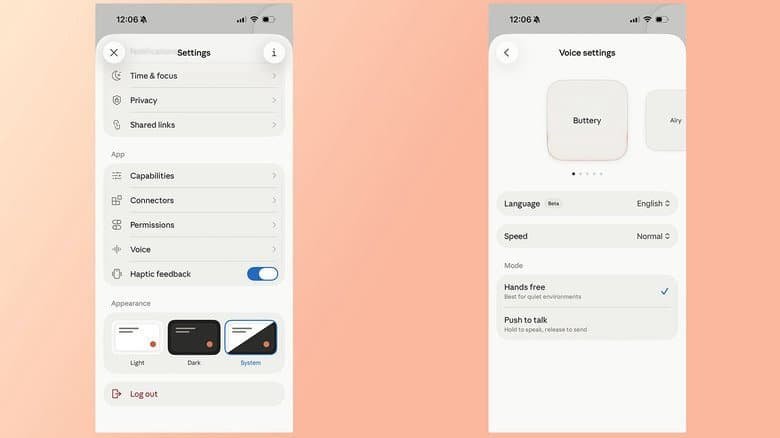
Open the Settings page and tap Voice, located below the App section of the menu. A carousel at the top plays a preview of each one. In English, the options are Buttery, Airy, Mellow, Glassy and Rounded.
Cadence is adjustable too, with Slow, Normal and Fast on offer. Recording comes in two forms, Hands free and Push to talk, and Anthropic suggests the former is best used in quiet environments.

What a free account gets you
No Pro or Max subscription is required to use Claude Voice. Free accounts are limited to Haiku and Sonnet, and for most prompts Sonnet should offer more than enough intelligence. Routing prompts through Opus takes a paid subscription.
Two other things free users should factor in. Voice conversations count against your usage limits, the same as typed ones. And free accounts are held to a single connection, though every supported language stays available.
Set it to Sonnet, switch to push to talk if anyone else is in the room, and ask one question per breath. The whole thing is built around waiting for your silence, so give it a clean one.