
Feed Gemini a 90-minute lecture and ask it one question about a single slide, and until now you paid for every second of that lecture. One frame per second, start to finish, whether the answer lived at minute three or minute 83.
Google is changing that. The company is adding agent-based video analysis to several Gemini models, and instead of scanning a video frame by frame at a fixed rate, the model hunts for relevant sections on its own. Google says that cuts token usage and costs by a wide margin.
The model decides where to look
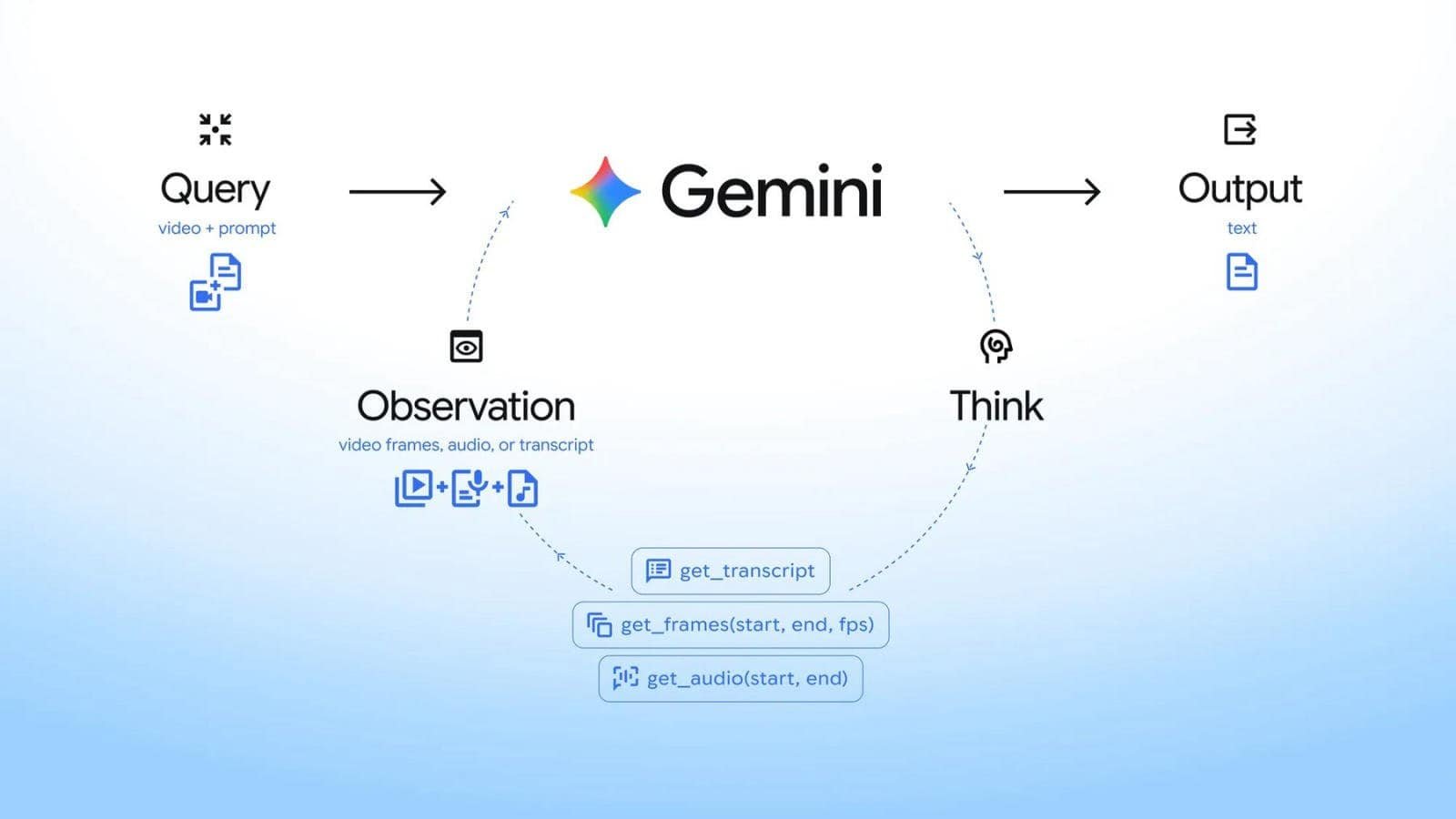
Google says the agent-based variant ties the model’s reasoning directly to native video tools. The model decides on its own which sections to look at, at what speed, and through which modality, whether that means frames, audio, or transcript. It only pulls the moments and signals it actually needs for a given task.
There’s an internal tool now that grabs just the relevant portion of the video file. Developers could build this kind of selective approach manually before. The difference is that nobody has to write that plumbing anymore.
Sub-second moments that used to vanish
The latest models, Gemini 3.7 Flash, 3.6 Flash and 3.5 Flash-Lite, can pick up moments shorter than one second. That includes state changes or cuts that would slip through at one frame per second. Google says this makes automated video editing far more precise.
That’s the part worth paying attention to. A cut, a flicker, a light turning on: at one frame per second those events either land inside a sampled frame or they don’t exist. The system can also track down individual scenes in hours of footage without burning through millions of tokens.
It spots anomalies by resampling suspicious time windows at a higher frame rate. And it accurately counts repeated movements and individual objects over time, which is the kind of task static sampling has always been bad at.
What static processing actually cost you
Until now, Gemini relied on static processing, sampling video at a fixed frame rate of one frame per second by default and adjustable through the API. Since native video analysis launched in 2025, Gemini has been transcribing the audio track and analyzing frames on a per-second basis.
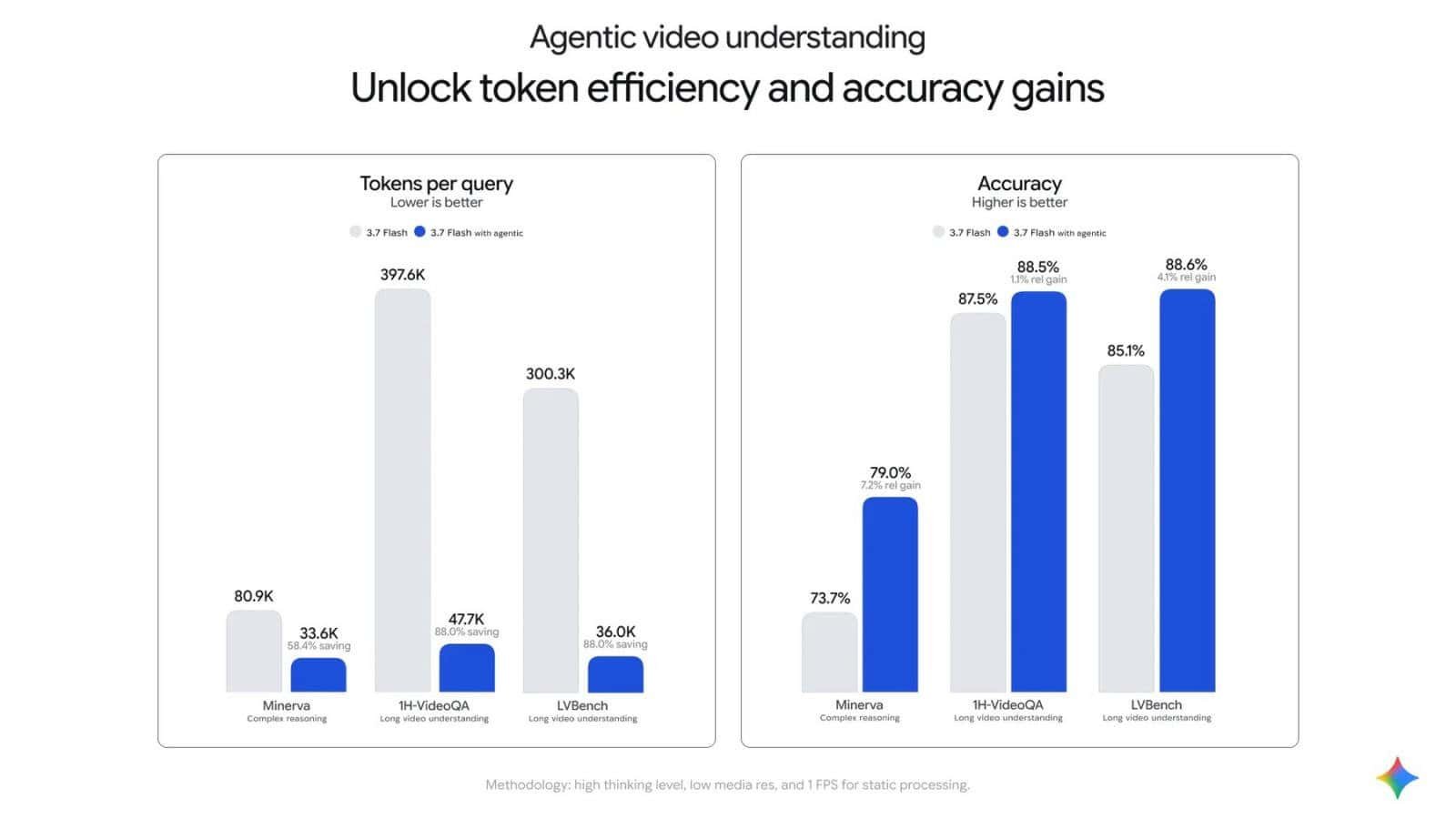
The efficiency gains show up most with long videos, anywhere from 10-minute tutorials to 90-minute lectures and multi-hour recordings. With static processing, developers had to pick between high token costs and methods that throw away important details. Neither option was good. Most people picked the cheap one and lived with the gaps.
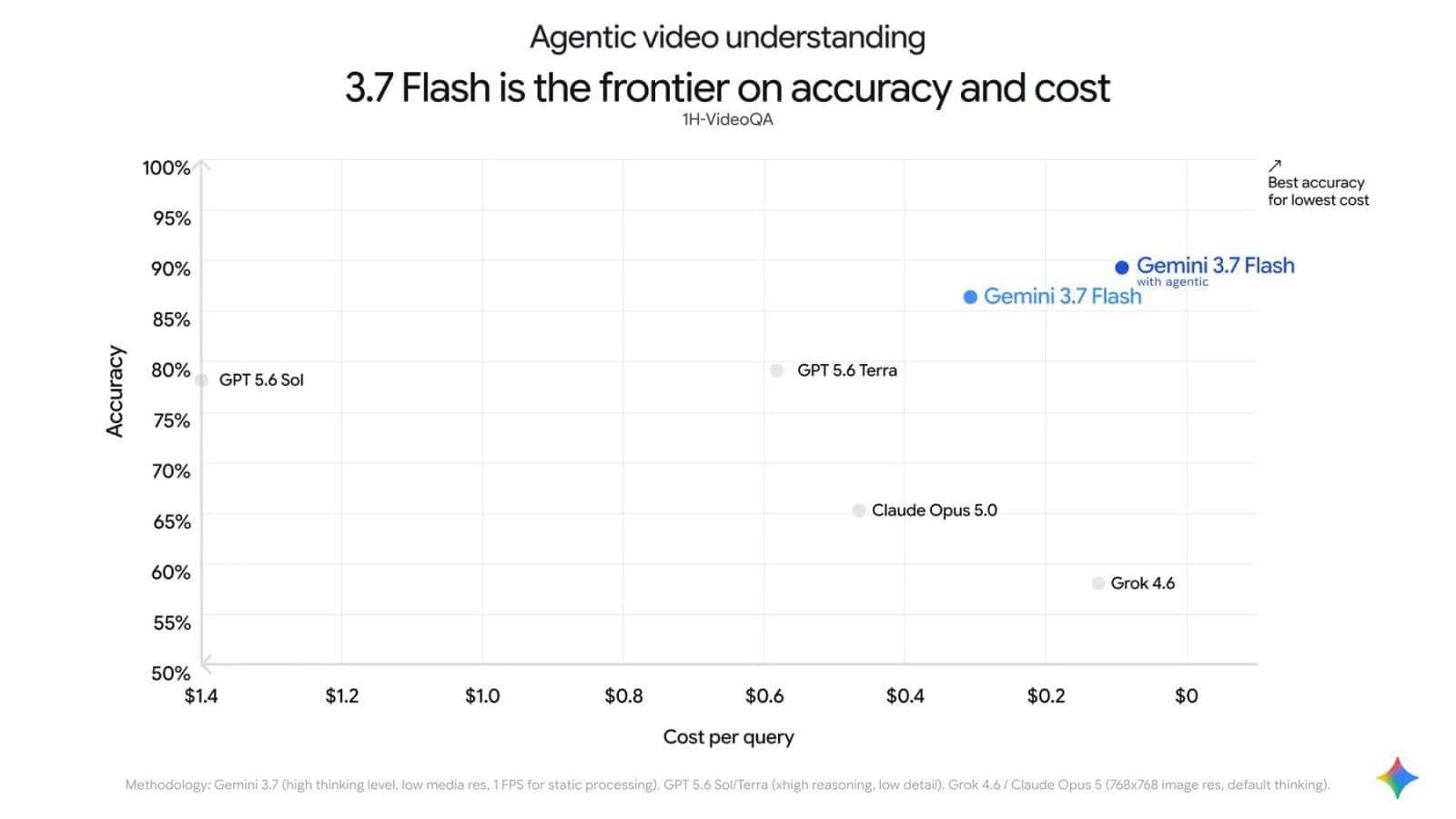
On Google’s own benchmarks, including LongVideoBench, Gemini 3.7 Flash with agent-based analysis scores the highest overall quality and delivers the best mix of accuracy and cost efficiency. Those are Google’s numbers on Google’s benchmarks, which is worth remembering.
This didn’t come out of nowhere
The approach builds on “agentic vision,” which Google shipped for Gemini 3 Flash in January. That feature let the model write and run Python code to zoom, crop and annotate images, checking each result in a think-act-observe loop before responding.
It didn’t work automatically in every case at launch. The groundwork was already there, though, and when Google announced Gemini 3 Flash back in December, the company flagged visual and spatial reasoning for video as a coming capability. This is that promise arriving.
How to turn it on, and what it costs
The feature is live for video uploads and YouTube videos through the Gemini API in Google AI Studio and on the Gemini Enterprise Agent Platform. Developers set the processing mode to “agentic” in the API config and pay standard Gemini API token rates with no added fee. More details are in the Developer Guide.
No premium tier, no surcharge for the smarter sampling. That’s unusual enough to note.
It’s coming to the apps too
Google plans to bring these improvements to its own products. The feature should roll out soon to all Gemini app users on Flash and Flash Lite devices.
Over the coming months, agent-based video analysis will also power the “Ask YouTube” feature on the playback page, giving answers more closely tied to what’s actually visible in the video. If you’ve ever asked a chatbot about a YouTube clip and gotten an answer clearly reconstructed from the transcript alone, that’s the gap this is meant to close.
If you’re running long-form video through the API today, flip the mode to “agentic” and re-run one job you already have cost data for. That comparison will tell you more than any benchmark chart.