
Audacity hasn’t shipped a change this large since Version 3.0 set off a ruckus more than five years ago. Version 4.0 is out today, and the free open-source audio editor now has a dark mode, overlapping clips and an envelope tool that anyone who’s automated a gain curve in Ableton Live will recognize on sight.
Users have been waiting to see how radically the software would change with this release. The short answer: plenty is different, but Muse Group’s developers seem to have focused on maintaining continuity for people who don’t want to relearn the program.

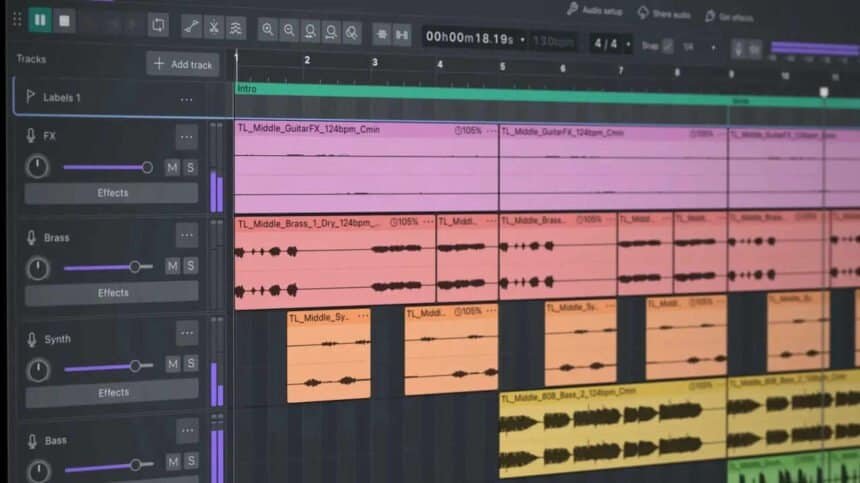
The dark mode is the first thing you’ll notice
The interface is more playful overall, with colored audio clips and more vibrant accent colors on UI elements like gain sliders. That’s a real departure for a program that has looked much the same for a long time.
If it’s not to your liking, don’t panic. The classic Audacity look has been preserved as an option you can enable during setup, so you never even need to see the new design.
Clips can finally overlap
Non-destructive editing, first explored in Version 3.2, is greatly expanded here. Clips can overlap now, and trimming back reveals the covered-over audio if you go too far.
Multiple clips can be selected and trimmed at once by dragging a single handle. They can also be grouped for complex edits.
The envelope tool borrows from the expensive stuff
Click to create a draggable control point for things like gain, and the waveform shows the change on-screen in real time. That means you can see whether you’re redlining one portion of a clip while you’re still dragging the point, not after you’ve rendered it.
There’s a new splitting tool for one-click clip cutting, too. It should feel familiar to anyone who uses other creative software, not just audio software, since everything from Adobe Premiere to Logic Pro includes a similar capability.
Sample-level editing, and a meter on every track
Zoom in far enough on a clip and you can now edit down to the sample level. That’s a genuinely useful ability when one of your clips is almost perfect but needs fine micro-adjustments.
Each track also gets its own meter, so you can figure out which track is clipping the mix instead of guessing.
Sync-lock is gone, and some people won’t like it
The removal of sync-lock, which ensured multiple clips could be edited in tandem, is likely to be the most controversial change in the release. Muse has added new keyboard shortcuts to replicate that functionality, which softens the blow but isn’t the same thing as leaving the feature alone.
That’s the pattern across most of Audacity 4. The editing changes will feel familiar to anyone who’s used a fully featured DAW like Ableton Live 12 or ProTools, and most of those programs cost hundreds of dollars or more. Getting this set of tools for free, in a program that has traditionally been a basic audio editor, is worth something.
Plugin support has been beefed up as well, alongside a longer list of smaller changes. If you’ve been putting off the upgrade because you didn’t want to relearn your workflow, turn on the classic look during setup and try the envelope tool first.