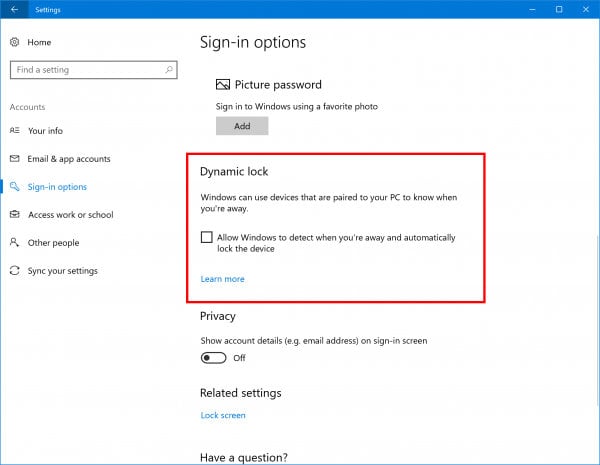

If you sometimes walk away from your laptop and forget to lock it, Windows has a built-in feature called Dynamic Lock that can lock it for you. You pair your phone with your PC over Bluetooth, then turn on Dynamic Lock in Settings > Accounts > Sign-in options. When you walk off with your phone and the Bluetooth connection drops, Windows can lock the PC on its own.
It doesn’t replace locking your PC yourself, but it gives you a backup for the times you forget. That matters most when you work from a coffee shop or coworking space and step out for a minute to take a call.
How Dynamic Lock works
Microsoft added Dynamic Lock in the Windows 10 Creators Update in 2017. It uses a phone paired over Bluetooth as a proximity indicator, which means Windows treats the phone as a sign that you’re nearby.
While your phone stays within Bluetooth range, Windows assumes you’re close to the computer. When you walk away with the phone and the connection is lost, Windows can lock the PC automatically. Think of it as an automatic version of pressing Windows + L every time you leave your desk.
You don’t need to install an app, create an account or set up any complicated automation. Everything you need is already in Windows Settings.
Pair your phone with your PC over Bluetooth
Dynamic Lock only works with a device that’s already paired, so do this first.
- Turn on Bluetooth on your phone.
- Pair your phone with your Windows PC over Bluetooth.
- Check that the phone shows as connected to your PC before you move on.
Turn on Dynamic Lock in Settings
Once your phone is connected, switching the feature on takes a few clicks.
- Open Settings.
- Go to Accounts > Sign-in options.
- Find the Dynamic lock section.
- Turn on Allow Windows to automatically lock your device when you’re away.
That’s all you need. From now on, Windows watches for your paired phone and locks the PC when it decides you’ve left.
Know the delay before you rely on it
Dynamic Lock doesn’t lock your PC the moment you leave Bluetooth range. Windows waits for the Bluetooth signal to drop below a certain threshold, and it also checks whether the PC is idle before locking.
In practice, it can take around 30 seconds to a full minute for the lock to kick in. That’s enough time for someone sitting nearby to walk up to your laptop and start looking through it.
Bluetooth connections can also behave differently depending on where you are and which devices you’re using. So don’t treat Dynamic Lock as a guaranteed security system.
Keep locking your PC manually
The safest habit is still to lock your PC yourself every time you step away. Press Windows + L before you get up, and it locks right away.
Use Dynamic Lock as a second layer for the moments you get distracted, walk off for a quick call or forget. It covers the gap between leaving your laptop unattended and remembering you should have locked it.
Frequently asked questions
How long does Dynamic Lock take to lock my PC?
Usually around 30 seconds to a full minute after you walk away. Windows has to notice the Bluetooth signal has dropped and that the PC is idle before it locks.
Do I need to install an app to use Dynamic Lock?
No. Dynamic Lock is built into Windows. You need a phone with Bluetooth that’s paired to your PC, and then you turn the feature on in Settings.
Can Dynamic Lock replace locking my PC with Windows + L?
No. Because of the delay, someone could still use your PC in the time before it locks. Manual locking with Windows + L is still the safer habit, and Dynamic Lock works best as a backup.
When was Dynamic Lock added to Windows?
Microsoft introduced it with the Windows 10 Creators Update in 2017.