Crypto Games
  • stadia_controllerGames
    trophyRankings
    • All live games
    • Best Crypto Games in 2026
    Missing a game?Tell us and it lands in the review queue.
    styleBy Genre30
    • Action
    • Adventure
    • AR
    • Arcade
    • Auto Battler
    • Brawler
    • Building
    • Casual
    • Collectible
    • Combat
    • Crypto Trading Card Games
    • Fantasy
    • Fighting
    • FPS
    • Horror
    • Metaverse
    • Mini Games
    • MMO
    • MMORPG
    • Multiplayer
    • On-Chain
    • PvP
    • Racing
    • Sci-Fi
    • Shooter
    • Space
    • Sports
    • Strategy
    • Turn-Based Strategy
    • Virtual World
    hubBy Blockchain26
    • Aptos
    • Arbitrum
    • Avalanche
    • Base
    • Berachain
    • Blast
    • BNB Chain
    • BRC-20
    • Cardano
    • Enjin
    • Ethereum
    • Gala Games
    • Immutable X
    • Klaytn
    • Myria
    • NEAR
    • opBNB
    • Polygon
    • Ronin
    • Sei
    • Solana
    • Somnia
    • Sui
    • TON
    • TRON
    • WAX
    devicesBy Device8
    • Android
    • Browser
    • iOS
    • Linux
    • Mac
    • Mobile
    • PC
    • Windows
  • tollTokens
  • eventEvents
  • groupsGuilds
  • account_balanceInvestors
  • dashboardDashboard
  • newspaperMagazine
    sports_esportsCrypto Games
    • News
    • Tournaments & Events
    • Educational
    • Top Lists
    • Guides
    • Reviews
    • Editorials
    • Metaverse
    • Airdrops & Giveaways
    • Presales
    • Interviews
    • All Crypto Games
    currency_bitcoinCrypto
    • News
    • Blockchains
    • Blockchain News
    • Dapps
    • Dapp News
    • NFT Collections
    • Press Release
    • All Crypto
    videogame_assetRegular Games
    • Upcoming Games
    • Gaming Industry
    • Nintendo
    • Leaks & Rumors
    • PC Gaming
    • PlayStation
    • Trailers & Gameplay
    • Xbox
    • Lists & Rankings
    • Retro Games
    • All Regular Games
    smart_toyAI
    • AI in Gaming
    • AI Safety & Ethics
    • AI Companies & Funding
    • AI Law & Policy
    • AI Agents
    • AI Models & Releases
    • AI Tools & Guides
    • AI Video & Media
    • AI in Science & Medicine
    • AI Chips & Hardware
    • All AI
    memoryTechnology
    • Gadgets & Hardware
    • Space
    • Cybersecurity & Privacy
    • Apps & Social Media
    • Science & Research
    • Guides
    • All Technology
    movieMovies & TV
    • TV Series
    • Movies
    • Netflix
    • Prime Video
    • Streaming Lists & Rankings
    • Anime & Manga
    • Comics & Superheroes
    • HBO Max & Disney+
    • TV Leaks & Rumors
    • TV Trailers & Teasers
    • All Movies & TV
  • add_circleSubmit a game
Reading: How to run powercfg /energy to find Windows battery drain
Share
Telegram News
Crypto Games Crypto Games
Font ResizerAa
  • Crypto Games
  • Crypto
  • AI
  • Technology
  • Entertainment
Search
  • stadia_controllerGames
    • Best Crypto Games in 2026
    • By Genre 30
      • Action
      • Adventure
      • AR
      • Arcade
      • Auto Battler
      • Brawler
      • Building
      • Casual
      • Collectible
      • Combat
      • Crypto Trading Card Games
      • Fantasy
      • Fighting
      • FPS
      • Horror
      • Metaverse
      • Mini Games
      • MMO
      • MMORPG
      • Multiplayer
      • On-Chain
      • PvP
      • Racing
      • Sci-Fi
      • Shooter
      • Space
      • Sports
      • Strategy
      • Turn-Based Strategy
      • Virtual World
    • By Blockchain 26
      • Aptos
      • Arbitrum
      • Avalanche
      • Base
      • Berachain
      • Blast
      • BNB Chain
      • BRC-20
      • Cardano
      • Enjin
      • Ethereum
      • Gala Games
      • Immutable X
      • Klaytn
      • Myria
      • NEAR
      • opBNB
      • Polygon
      • Ronin
      • Sei
      • Solana
      • Somnia
      • Sui
      • TON
      • TRON
      • WAX
    • By Device 8
      • Android
      • Browser
      • iOS
      • Linux
      • Mac
      • Mobile
      • PC
      • Windows
  • tollTokens
  • eventEvents
  • groupsGuilds
  • account_balanceInvestors
  • dashboardDashboard
  • newspaperMagazine
    • Crypto Games 11
      • News
      • Tournaments & Events
      • Educational
      • Top Lists
      • Guides
      • Reviews
      • Editorials
      • Metaverse
      • Airdrops & Giveaways
      • Presales
      • Interviews
      • All Crypto Games
    • Crypto 7
      • News
      • Blockchains
      • Blockchain News
      • Dapps
      • Dapp News
      • NFT Collections
      • Press Release
      • All Crypto
    • Regular Games 10
      • Upcoming Games
      • Gaming Industry
      • Nintendo
      • Leaks & Rumors
      • PC Gaming
      • PlayStation
      • Trailers & Gameplay
      • Xbox
      • Lists & Rankings
      • Retro Games
      • All Regular Games
    • AI 10
      • AI in Gaming
      • AI Safety & Ethics
      • AI Companies & Funding
      • AI Law & Policy
      • AI Agents
      • AI Models & Releases
      • AI Tools & Guides
      • AI Video & Media
      • AI in Science & Medicine
      • AI Chips & Hardware
      • All AI
    • Technology 6
      • Gadgets & Hardware
      • Space
      • Cybersecurity & Privacy
      • Apps & Social Media
      • Science & Research
      • Guides
      • All Technology
    • Movies & TV 10
      • TV Series
      • Movies
      • Netflix
      • Prime Video
      • Streaming Lists & Rankings
      • Anime & Manga
      • Comics & Superheroes
      • HBO Max & Disney+
      • TV Leaks & Rumors
      • TV Trailers & Teasers
      • All Movies & TV
  • add_circleSubmit a game
Follow US
Copyright © 2026 CryptoGames.GG. All Rights Reserved.
Crypto Games > Blog > Technology > Technology Guides > How to run powercfg /energy to find Windows battery drain
Technology Guides

How to run powercfg /energy to find Windows battery drain

George Tsagkarakis By George Tsagkarakis - Owner Last updated: September 26, 2026 8 Min Read
We may include affiliate links in our content, meaning we could earn a commission—or receive blockchain-based assets—if you click a link and make a purchase or take a specific action. Additionally, we use generative AI to help draft and refine our posts for clarity and grammar. All content is fact-checked and reviewed by a human editor before publication.
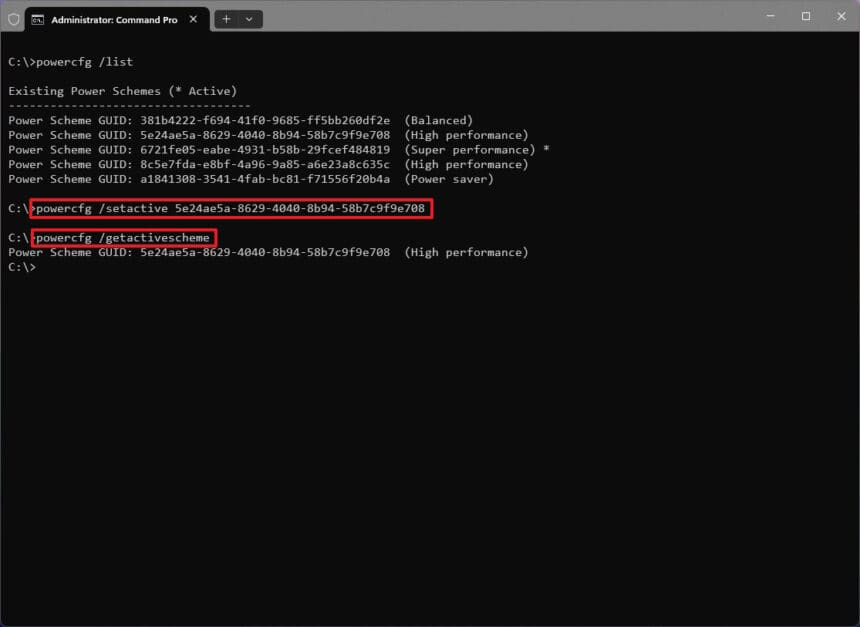
How to run powercfg /energy to find Windows battery drain Image Source: Futurecdn
How to run powercfg /energy to find Windows battery drain
SHARE
Get our stories first on GoogleAdd cryptogames.gg as a preferred source and our reporting shows up higher in your Top Stories.

If your Windows laptop’s battery is draining faster than usual and Task Manager shows nothing obvious, run powercfg /energy. The command watches your system for 60 seconds while it sits idle. It then writes an HTML report that lists errors, warnings and information about your power plan, USB devices, timer requests and CPU-heavy processes, so you can see what’s keeping your hardware awake.

Contents
Why Task Manager doesn’t always show the causeRun the powercfg /energy reportGive the trace more timeRead the report without chasing every red entryDecide which findings matterCheck what’s keeping your PC awake with powercfg /requestsFollow the trail with other powercfg commandsUse the right report for the right questionFrequently asked questionsHow long does powercfg /energy take to run?Do I need to fix every error in the energy report?How do I check my laptop’s battery health instead?How can I tell whether my laptop is sleeping properly?

Why Task Manager doesn’t always show the cause

Task Manager is good at catching an app that’s hammering the CPU. Many power problems happen lower down, where it can’t show them.

Some common examples:

Ad image Ad image
  • A USB device that won’t power down
  • An app that keeps asking Windows for a high-resolution system timer (a faster internal clock that stops the processor from resting)
  • A power plan set up so your hardware runs harder than it needs to

The powercfg /energy diagnostic is built to catch these. It runs a trace (a short recording of system activity) and checks Windows for common energy-efficiency and battery-life problems.

Run the powercfg /energy report

Close your apps and documents before you start. Microsoft recommends running the trace while the PC is idle, and the difference is large. In one test, a first run with apps open showed average CPU utilization of 45.95%, and a download manager alone accounted for 27.02%. After closing unneeded apps and running it again, average CPU utilization dropped to 3.67% and the warning count fell from 22 to 11.

  1. Close the apps and documents you don’t need.
  2. Open Terminal as administrator.
  3. Run this command:
    powercfg /energy /output "$env:USERPROFILE\energy-report.html"
  4. Leave the PC alone while the trace runs.
  5. Read the summary when it finishes. Windows tells you how many errors, warnings and informational entries it found, and where it saved the HTML file.
  6. Open the report with:
    Start-Process "$env:USERPROFILE\energy-report.html"

Give the trace more time

If the problem comes and goes, a 60-second window may miss it. Add /duration to watch for longer. For example, powercfg /energy /duration 120 extends the observation window to two minutes.

Read the report without chasing every red entry

The report sorts its findings into Errors, Warnings and Information. Some entries are easy to understand. Others read like a driver engineer’s debugging notes.

Findings you’re likely to see include:

  • The High Performance power plan being active
  • A disabled sleep timeout
  • Wi-Fi set to maximum performance
  • PCI Express power management settings
  • USB devices that aren’t entering selective suspend (the low-power state an idle USB device should drop into)
  • Programs asking Windows for shorter timer resolutions
  • Individual processes that used a large share of the CPU during the trace

The report is specific. A USB warning can include the hardware ID of the device that won’t suspend. A timer warning can name the process asking for a different timer resolution. High CPU usage lists the individual executables, so you don’t have to hunt through Task Manager.

Decide which findings matter

Not every error is a fault. A USB error pointing to USB\VID_2F6E&PID_4E17 turned out to be a Scarlett 2i2 audio interface with an active audio stream. A device that’s playing audio should stay awake, so that entry wasn’t a battery problem at all.

Apply the same judgment to the rest of the report:

  • High CPU usage while you’re encoding video means something different from high CPU usage while the laptop sits untouched.
  • A long display timeout may be a setting you chose on purpose.
  • Some platform-power warnings come from hardware or firmware limits that you can’t fix by changing a Windows setting.

Use the report to shrink your list of suspects. Start with the findings that match the battery or power problem you’re seeing, and look into those first.

Check what’s keeping your PC awake with powercfg /requests

If the energy report suggests an app or device is keeping the machine awake, run:

powercfg /requests

This shows application and driver power requests that can stop the display from turning off or stop the PC from entering a lower-power sleep state. For example, it can show a browser holding a video wake lock and an execution request because it’s playing audio, or a USB audio device with an active audio stream. That context helps explain USB and timer warnings you saw in the energy report.

Follow the trail with other powercfg commands

If you need to dig further, these commands answer narrower questions:

  • powercfg /lastwake tells you what woke the PC during its most recent sleep transition.
  • powercfg /waketimers lists any active wake timers.
  • Get-PnpDevice in PowerShell can usually turn an unfamiliar USB hardware ID from the report into a device name you recognize.

If one peripheral keeps showing up, Windows can also show you which devices are allowed to wake your PC, so you can narrow that list down.

Use the right report for the right question

powercfg /energy is best for catching inefficient behavior or questionable settings while the system is running. Windows has separate reports for other questions:

  • powercfg /batteryreport generates a battery report with usage and capacity history. Use it when you want to judge the health of the battery itself.
  • powercfg /sleepstudy covers Modern Standby. It helps you find out whether your laptop is actually sleeping and what it was doing while the screen was off.

You don’t need to run /energy every week to clear every red box. It’s most useful when your PC starts behaving differently and the usual battery page in Settings gives you nothing to work with. Let Windows settle for a minute, run the report, and use it to decide where to look next, rather than changing power settings at random.

Frequently asked questions

How long does powercfg /energy take to run?

By default it watches your system for 60 seconds. You can extend that with /duration, for example powercfg /energy /duration 120 for two minutes.

Do I need to fix every error in the energy report?

No. Some entries reflect normal activity, such as an audio device staying awake while it plays sound, and some come from hardware or firmware limits you can’t change in Windows. Focus on findings that match the problem you’re seeing.

How do I check my laptop’s battery health instead?

Run powercfg /batteryreport. It generates a report with your battery’s usage and capacity history.

How can I tell whether my laptop is sleeping properly?

On Modern Standby laptops, run powercfg /sleepstudy to see whether the laptop is sleeping and what it was doing while the screen was off. powercfg /lastwake shows what woke it most recently.


You Might Also Like

Paysafe launches Pay with Crypto, expanding payment options for users.

Gigaverse ties Gigling races to Loot Survivor dungeon keys in new cross-game event

Xbox has 3 years to prove the reset worked

Elon Musk Claims AI Will Create GTA 6 For You

Pudgy World Launches Season 1

TAGGED:AllMicrosoftpowercfgScarlett 2i2Task ManagerWindows 11
Share This Article
Facebook X Whatsapp Whatsapp Reddit Telegram Copy Link Print
Share
By George Tsagkarakis
Owner
Follow:
George Tsagkarakis, known as Staycalm4now is a professional author in the crypto gaming industry since early 2018. He has experienced all the growth of Blockchain Gaming and helped multiple projects achieve their goals and established a player base. He is the co-founder of egamers.io and now the Founder and owner of CryptoGames.gg He is also the COO of MyStage, an AI x Crypto Startup.
Previous Article Pokémon Gives Scyther a Wild New Look 30 Years After Its Debut Pokémon Gives Scyther a Wild New Look 30 Years After Its Debut
Next Article Anthropic's biolab made a find it's comparing to Crispr Anthropic’s biolab made a find it’s comparing to Crispr
Leave a Comment
Subscribe
Login
Notify of
Please login to comment
0 Comments
Oldest
Newest Most Voted
FacebookLike
XFollow
YoutubeSubscribe
TiktokFollow
TelegramFollow

Stay Updated

Join our telegram Channel and stay in the loop with the most important news.

Top games right now

Ranking updated 4h ago

1Axie InfinityEthereum · Ronin · Card$189M token · our verdict → 2The SandboxEthereum · Adventure$127M token · our verdict → 3IlluviumEthereum · Immutable X · Auto Battler$26M token · our verdict → 4Big TimeEthereum · Adventure$18M token · our verdict → 5PixelsEthereum · Ronin · Adventure$4.3M token · our verdict → 6CornucopiasBNB Chain · Metaverse$1.8M token · our verdict →Browse all 566 live games
Latest News
Anthropic's biolab made a find it's comparing to Crispr
Anthropic’s biolab made a find it’s comparing to Crispr
September 26, 2026
How to run powercfg /energy to find Windows battery drain
September 26, 2026
Pokémon Gives Scyther a Wild New Look 30 Years After Its Debut
September 26, 2026
Microsoft is quietly retiring the 'Copilot Plus PC' brand
Microsoft is quietly retiring the ‘Copilot Plus PC’ brand
September 26, 2026
Decrepit — Brutal Medieval Soulslike Mashes Up Dungeon Crawler Carl and Dark Souls
Brutal Medieval Soulslike Mashes Up Dungeon Crawler Carl and Dark Souls
September 26, 2026
How to free up RAM that Windows apps don't release
How to free up RAM that Windows apps don’t release
September 26, 2026
ChatGPT Voice moves closer to "Her" with email, calendar and Slack access
ChatGPT Voice moves closer to “Her” with email, calendar and Slack access
September 26, 2026
Marvel's Spider-Man 3 Green Goblin Leak Has Gamers Divided
Marvel’s Spider-Man 3 Green Goblin Leak Has Gamers Divided
September 26, 2026

You Might Also Like

Chainers opens four-day 'Survivor Swarm' event, adds bees to its animal roster
Crypto GamesTournaments & Events

Chainers opens four-day ‘Survivor Swarm’ event, adds bees to its animal roster

6 Min Read
PlayStation 5 — New PS5 Boxes Now Carry an Official Sony Warning About 2028
PlayStationRegular Games

New PS5 Boxes Now Carry an Official Sony Warning About 2028

4 Min Read
Deribit shifted 90% of client assets to Coinbase, then pulled its daily proof-of-reserves check
Blockchain NewsCrypto News

Deribit shifted 90% of client assets to Coinbase, then pulled its daily proof-of-reserves check

5 Min Read
"Unlock Exclusive Rewards: Join Z.ink Airdrop Season Origin for Blockchain Gamers Now!"
Crypto GamesCrypto Games News

Z.ink Airdrop Season O.rigin Now Available for Active Blockchain Gamers

4 Min Read

Always Stay Up to Date

Subscribe to our newsletter to get our newest articles instantly!
Follow on TelegramRSS feeds
Crypto Games GG Logo. Crypto Games GG Logo.

CryptoGames.GG is a Crypto Games List and News Portal.

We share valuable information about Play To Earn Games and Other Web3 Projects.

While CryptoGames.GG uses AI to produce and draft content; every piece of information is fact-checked by a human, reviewed, and edited as needed.

News

  • Crypto Games News
  • Reviews
  • Crypto Games Guides
  • Tournaments & Events
  • Crypto News
  • Blockchain News
  • NFT Collections
  • Regular Games
  • AI
  • Technology
  • Movies & TV Series

The Boring Stuff

  • About Us
  • RSS Feeds
  • Contact
  • Disclaimer
  • Terms and Conditions
  • Privacy Policy
  • Review Process Statement
  • Editorial Standards
  • Corrections Policy

Join Our New Telegram Group

Discover the most importa news, from presales to giveaways and game updates.
Join Now
2026 CryptoGames.GG All Rights Reserved
wpDiscuz
Welcome Back!

Sign in to your account

Username or Email Address
Password

Lost your password?

Not a member? Sign Up